
The WaiterMate Training Module provides a safe and structured environment for staff training and development. It helps businesses to onboard new team members, practise workflows, and support ongoing training without affecting live sales data.
Configure the module in OfficeMate to make the feature available for available to users in WaiterMate.
Step 1: Allow the Module in OfficeMate
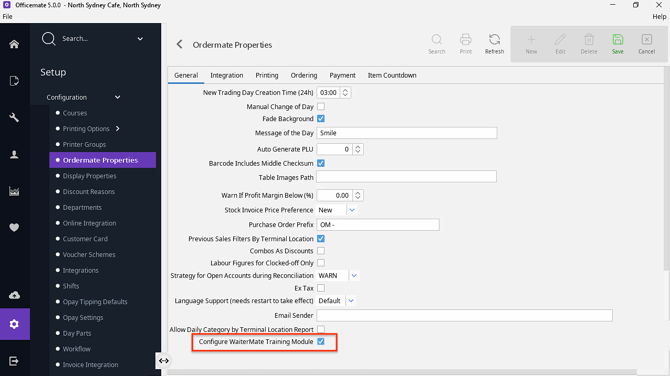
Before the WaiterMate Training Module can be seen in WaiterMate, it must first be enabled in OfficeMate.
- Open OfficeMate
- Select OrderMate Properties
- Open the General tab
- Select Configure WaiterMate Training Module
- Select Save
- Confirm the changes have been saved successfully
- Restart each WaiterMate terminal
Once saved and restarted, users can access the WaiterMate Training Module based on their permissions.
Important Information
-
Enabling the WaiterMate Training Module makes the feature available for use, but access is still controlled by user permissions.
-
The WaiterMate Training Module is a per device configuration, making it possible to make on terminal
Learn more about the WaiterMate Training Module:
- Enable the WaiterMate Training Module
- Using the WaiterMate Training Module
- Available from Ordermate Version 5.0.0a