
Summary
The COGS (cost of goods) Report is one of the reports included with the Stock Control Module. It is used to look at in-depth sales and costing information for Menu Items and Sections.
This report looks at purchase costs, and will only be effective with accurate Purchase Costs.
Note: To find the report search 'COGS' in OfficeMate
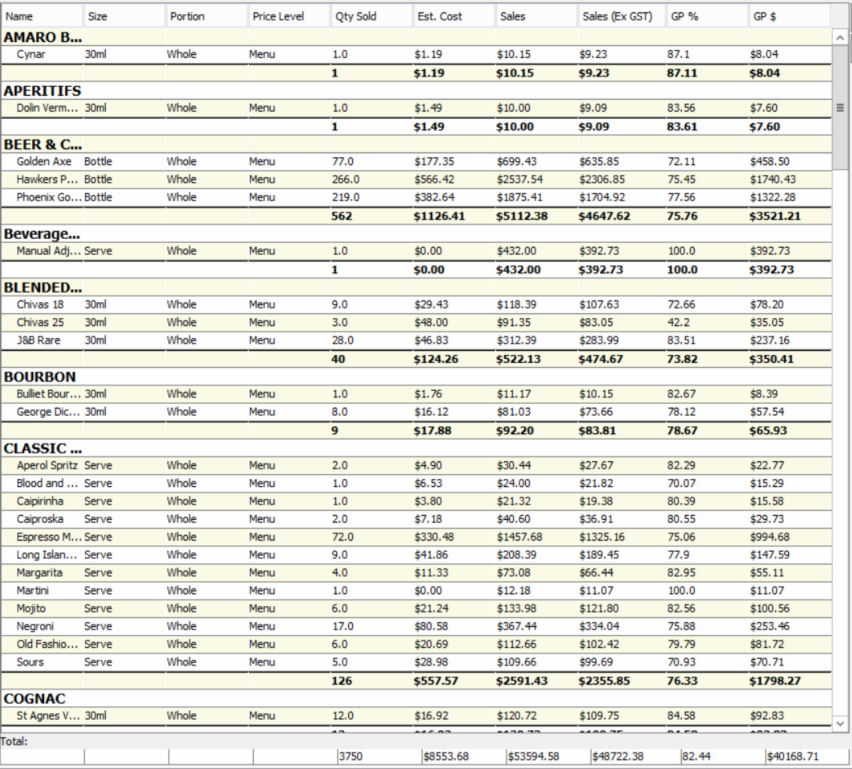
The Information in the Report
Name
- The name of the Menu Item that appears in WaiterMate
QTY Sold
- The total number of times that Menu Item has been ordered
Size
- Each size of each item that has been sold, separated on different lines.
Price Level
- The price level that the item has been sold at, separated on different lines
Portion
- If the item has a different portion (ie Pizza), they will display on separate lines
Estimated Cost
- The total estimated cost of the Stock Item that is linked to the Menu Item
Sales
- The total sales accrued for the Menu Item
Sales (ex GST)
- The total sales accrued for the Menu Item, excluding the GST component.
Gross Profit %
- The gross profit is calculated from the Cost (from the stock item) and the Sale (from the menu item) this column is calculated in a percentage
Gross Profit $
- The gross profit is calculated from the same values as above, but is presented as a dollar figure